
BOSCH logoHome Appliances
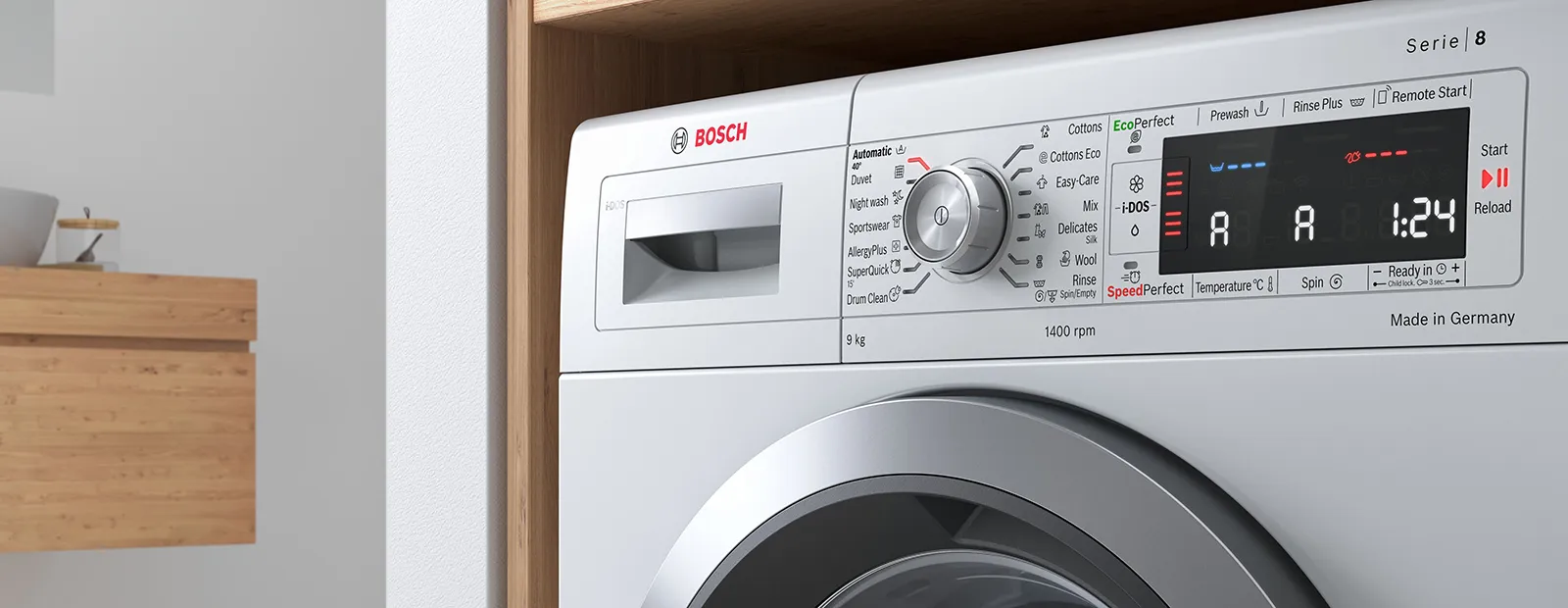
Close up of of appliance showing washing machine symbols

Washing Machine Symbols & Settings

What do washing machine symbols mean?

As a global leader in home appliances we know a thing or two about laundry. With new innovations that make washing easier and even more efficient, it can be confusing to keep up with the many programmes and symbols that appear on modern washing machines.

With our washing machine symbols guide we will explain everything you need to know to make washing simple. From the symbols on your control display and detergent drawer, to feature settings that make washing convenient.

Washing Machine Display Symbols

Below are the explanations of symbols you might find on your washing machine display.


Childproof lock icon
Childproof LockWhen the child lock is activated, all the washing machine buttons will be disabled. To deactivate, press and hold the start button or the key symbol button for three to five seconds. After this time the key symbol will disappear.
This image shows three simple black icons representing common media player controls: play, pause, and stop.
Start/ReloadUse the button to pause the running cycle and open the door to simply reload forgotten items into the drum and continue the wash. (Not possible on washes over 50°C)
Water drop icon. Simple black and white graphic symbol.
Water ConsumptionThis washing machine symbol indicates the water consumption for the selected programme. Low is shown as one dash, high is shown with 5 dashes.
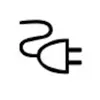
Electrical plug symbol with power cord.
Energy ConsumptionThis washing machine symbol indicates the energy consumption for the selected programme. Low is shown as one dash, high is shown with 5 dashes.
Simple black shopping cart or basket icon on white background.
PrewashA low temperature cycle before the main wash. Can be activated or deactivated. Ideal for washing heavily soiled laundry.
Washing icon
WashingThe programme process is shown as washing.
Soaking icon
SoakingBefore the main wash cycle starts, the laundry remains in the water for longer. Ideal for laundry with particularly stubborn soiling.
Spin speed icon
Spin SpeedThe programme is shown as spinning. Depending on what stage the programme is in, you can change the spin speed before and during the programme.
Iron icon
Easy IronReduces creasing in the laundry by adapting the spin cycle and the spin speed. The laundry is damp enough after washing that it needs to be hung out on a washing line.
Rinse icon
RinseThe programme process is shown as rinsing.
Extra rinse icon
Extra RinseUp to three additional rinse cycles can be activated or deactivated. It is recommended to use for particularly sensitive skin or in regions with very soft water.
Rinse hold icon
Rinse HoldThe laundry will remain in the water after the last rinse cycle. Activate or deactivate spinning and draining at the end of the washing cycle.
Adding laundry icon
Adding LaundryIf this symbol goes out on the display panel, it is possible to add more laundry.
silent wash icon
Silent WashThe audible signal at the end of programme is deactivated and the final spin speed is reduced.
Intensive plus icon
Intensive PlusThe programme duration is extended by up to 30 minutes. Suitable for heavily soiled laundry.
antistain icon
AntiStainUse this washing machine symbol to select the type of stain. The temperature, drum movement and soaking time are all adjusted to suit the type of stain.
water plus icon
Water PlusWash with more water. Recommended for particularly sensitive skin and for treating laundry more gently.
idos icon
i-DosYou can change the settings for automatic detergent dosing before the washing programme starts and during pre-wash. Light: For lightly soiled laundry Medium: For normally soiled laundry Heavy: For particularly heavy soiling and/ or staining
Drum clean icon
Drum CleanIf there are odours in the washing machine or drum, run a Drum clean programme with no clothing in.
memory icon
Memory ProgrammeYou can save a selected programme with your favourite settings here. Simply select a programme and change it to your desired settings, press and hold the symbol for 3 seconds and the programme will be saved.
Tablet device icon with wireless signal, representing wireless connectivity or internet access.
Remote StartIf you briefly press the button, the appliance will be enabled for remote start via the Home Connect app If you press the button for approx. 3 seconds, the Home Connect menu opens.
foam icon
Foam DetectionIf this washing machine symbol lights up in the display panel, the appliance has detected too much foam during the wash cycle and will automatically activate an additional rinse cycle to remove the foam. Tip: Add less detergent to the next washing cycle with the same load.
Tap icon
TapThe water pressure is too low or the supply hose is blocked or kinked.

Washing Machine Features

Find all the convenient features that make your life easier when using your washing machine.

WaveDrum

Preserve delicate clothing with Wave Drum. The unique, patented VarioDrum system structure uses even water distribution to gently and efficiently wash all types of clothing - without stretching, creasing or damaging your most beloved items.

SilentPowerDrive™

Washing machines with SilentPowerDrive™ drive generate noise of just 41 decibels. That's quieter than the sound of the sea at 55 decibels.
SilentPower Drive icon

Aqua Stop

AquaStop gives you peace of mind that the water will stop in the event of a leak. The AquaStop function locks the water supply via a shut-off valve.
aqua stop icon

i-DOS

Save money and time with i-DOS as it automatically senses exactly the right amount of water and detergent to use, as well as the correct temperature. The machine adapts to fabrics, level of soiling and weight of the load.

i-dos icon

Reload

Never leave that one sock behind again! With Reload simply pause the cycle and the machine will automatically adjust the water. This then allows you to add or remove any items of any size to your wash.
Reload icon

Time Delay

If you are going to bed or going out to work, simply have your laundry ready when you need it. Just delay the wash at the press of a button.
time delay icon

AntiVibration Design

A spiral design on the side of the washing machine that increases stability and reduces vibration. The enhanced insulation also regulates noise levels, making Bosch washing machines very quiet, even during the spin cycle.
vibration icon

ActiveWater Plus

This function delivers perfect results by only using the water needed. Built-in sensors adjust the water consumption according to the fabric type and the automatically detected load, while the patented drum and water induction systems allow for faster soaking. Choose the wash that helps you manage your water usage and delivers all-round peace of mind.
active icon

Home Connect Remote Control

No need to worry about your washing sitting damp in your washing machine anymore. When you know you won't be around for the end of the cycle, simply pause the wash which will stop the cycle before the final rinse. When you're ready, start the final rinse and your clothes will come out clean and smelling fresh.

home connect icon

SpeedPerfect

Developed for situations where time matters. Reduce your washing time by up to 65%. Use in conjuction with most programmes. For example select your chosen programme, and then choose the Speed Perfect setting to save time.
speedperfect icon

Quiet Wash

This function reduces the high spin speed during the spin cycle so you can do your washing without disturbing your family.

Allergy Plus

Special setting specifically for the needs of allergy sufferers and sensitive skin.

Drum Clean reminder

After 20 cycles operating under 40 degrees, your washing machine will automatically remind you to clean the drum using the DrumClean programme to maintain perfectly cleaned washing.

4D Wash System

This is a highly efficient water and detergent fabric penetration system for spotless results.The system is based on a combination of water spray and additional extra spin wash, soaking the laundry more evenly and effectively. The Intensive Plus option is specifically for heavily soiled washing and large amounts of washing which require cleaning.

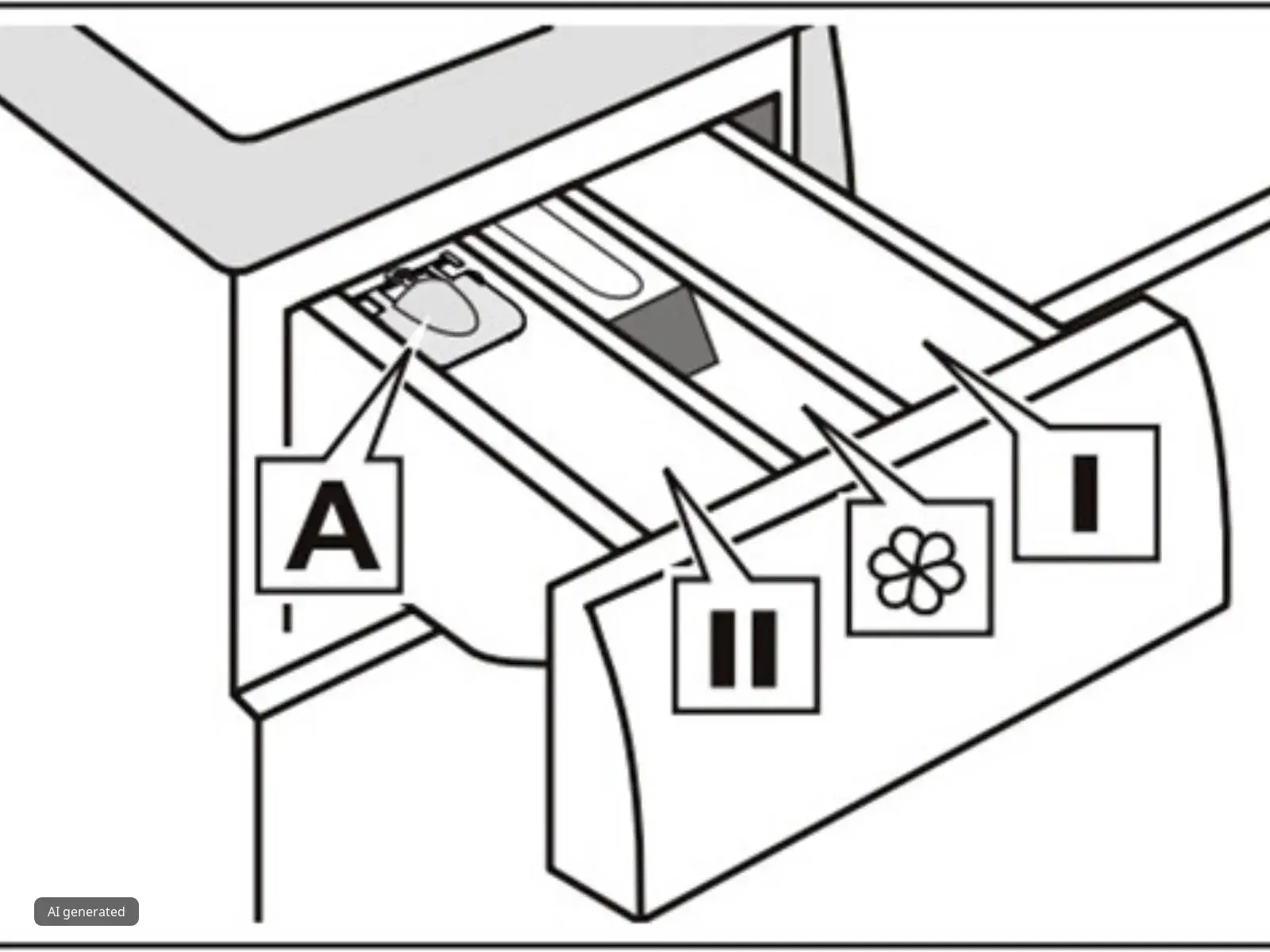
Which is the detergent drawer?

A = liquid detergent flap

II = Detergent for the main wash, water softener, bleach, stain remover Compartment

Flower = Fabric softener, liquid starch; Do not exceed max. mark

= Detergent for prewash

*not specific to all models
Detergent draw diagram
Washing machine in home
Which washing machine programme should I use?Find the most important programmes that can be found on our Bosch washing machines and in what situations they should be used. Find out more
Repair Service
Need to book a repair? Arrange for an engineer.
Repair Service
User Manuals
Find your user manual for product support.
User Manuals
Contact Us
Contact us for further support and help.
Contact Us
Spare Parts
Search our store for original spare parts.
Shop parts